Dagelijkse rekenmachines
Zeventien eenvoudige tools voor de getallen van elke dag — fooi, percentages, leningen, btw, sparen, schulden, marge, brandstofkosten, BMI en meer. Kies er een om te beginnen.
Fooi
Percentage
Korting
BTW
Rekening delen
Eenheden omrekenen
Lening & hypotheek
Hypotheek
Salarisberekening
Samengestelde rente
BMI & calorieën
Datum & leeftijd
Tijd & uren
Schuld aflossen
Oppervlakte
Marge & opslag
Margin & Markup Calculator — profit, margin and markup
This calculator turns a cost and a sale price into the three numbers every seller needs: the profit in money, the profit margin as a percentage of the price, and the markup as a percentage of the cost. Enter what an item costs you and what you sell it for, and all three update as you type.
Margin vs markup — the key difference
They are easy to confuse because they measure the same profit against different bases. Margin is profit divided by the sale price; markup is profit divided by the cost. A product bought for 60 and sold for 100 has a 40% margin (40 ÷ 100) but a 67% markup (40 ÷ 60). Margin can never exceed 100%, but markup can.
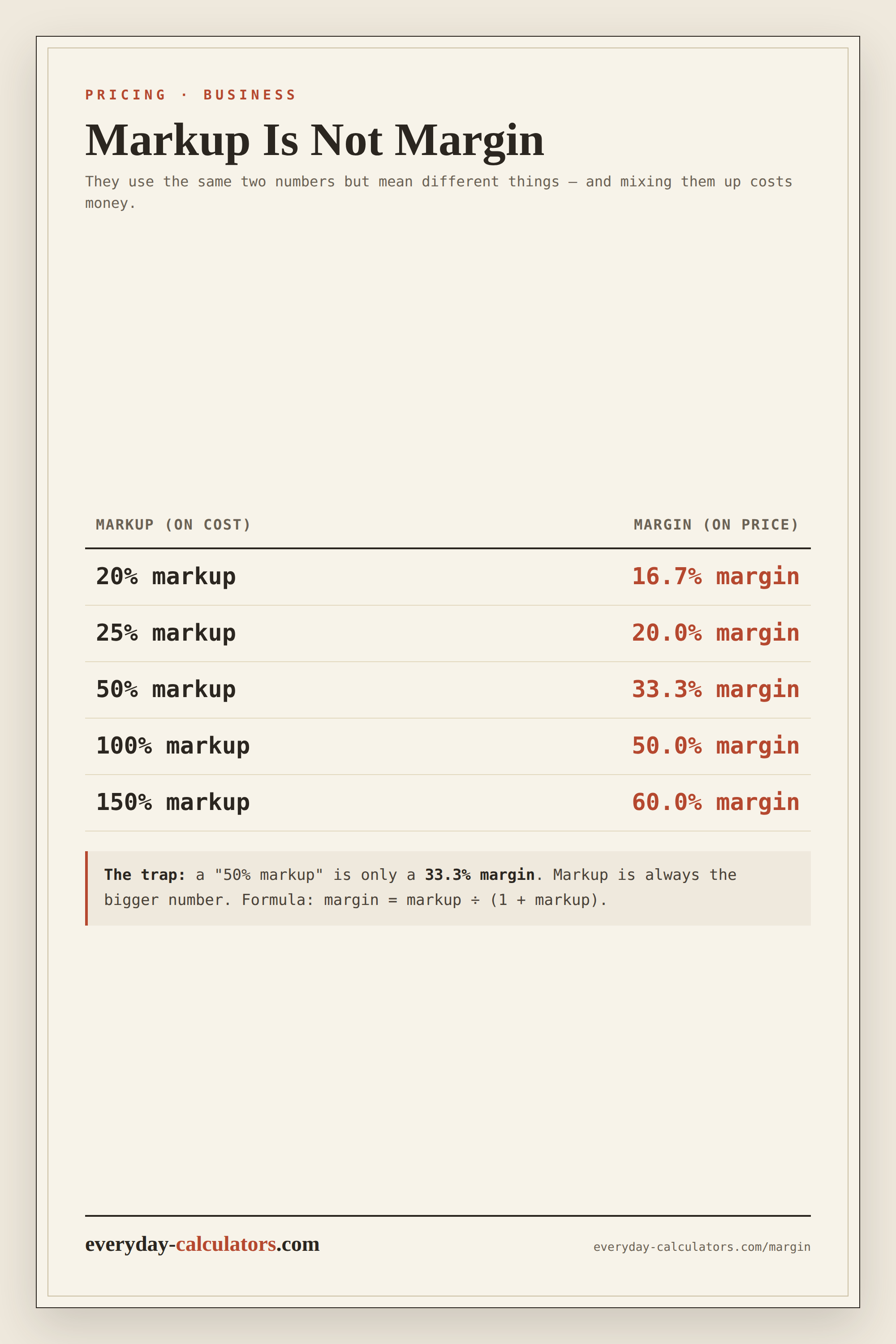
How the numbers are calculated
Profit is the sale price minus the cost. Margin is profit ÷ price × 100, and markup is profit ÷ cost × 100. If the price is below the cost, the profit and both percentages are negative — a useful warning that you are selling at a loss.
Working backwards to a price
If you know the margin you want, you can find the price: price = cost ÷ (1 − margin). To hit a 40% margin on a 60 cost, sell at 60 ÷ 0.6 = 100. To hit a target markup instead, price = cost × (1 + markup).
Why margin matters more than markup
Margin tells you what share of each sale you actually keep, which is what feeds overheads and profit. Two businesses with the same markup can have very different margins once discounts and fees are included, so margin is usually the figure to watch.
Example
You buy a product for 40 and sell it for 100. Your profit is 60, your margin is 60% and your markup is 150%. Drop the price to 60 and the profit falls to 20, the margin to 33% and the markup to 50%.
— Dit is een algemene schatting ter informatie, geen financieel advies. De resultaten gebruiken standaardformules en bevatten niet elke kosten, belasting of toekomstige renteverandering — controleer de cijfers bij je geldverstrekker, bank of een adviseur voordat je beslist.
Brandstofkosten
Veelgestelde vragen
What is the difference between margin and markup?
Margin is profit as a share of the sale price; markup is profit as a share of the cost. The same 40 profit on a 100 sale is a 40% margin but a 67% markup.
How do I calculate profit margin?
Subtract the cost from the sale price to get the profit, then divide by the sale price and multiply by 100. Profit ÷ price × 100 is your margin percentage.
How do I find the price for a target margin?
Divide the cost by one minus the margin. For a 40% margin on a 60 cost, sell at 60 ÷ 0.6 = 100.
Can margin be more than 100%?
No — margin is a share of the price, so it maxes out below 100%. Markup has no upper limit because it is measured against the cost.
What if the price is below the cost?
The profit and both percentages turn negative, which means you are selling at a loss — a useful check before you set a price.