Calculatrices du quotidien
Dix-sept outils simples pour les chiffres du quotidien — pourboire, pourcentages, prêts, TVA, épargne, dettes, marge, coût carburant, IMC et plus. Choisissez-en un pour commencer.
Pourboire
Pourcentage
Remise
TVA
Partage de l'addition
Convertisseur d'unités
Prêt & hypothèque
Hypothèque
Convertisseur de salaire
Intérêts composés
IMC & calories
Date & âge
Heures & durée
Remboursement de dette
Surface
Marge & marque
Margin & Markup Calculator — profit, margin and markup
This calculator turns a cost and a sale price into the three numbers every seller needs: the profit in money, the profit margin as a percentage of the price, and the markup as a percentage of the cost. Enter what an item costs you and what you sell it for, and all three update as you type.
Margin vs markup — the key difference
They are easy to confuse because they measure the same profit against different bases. Margin is profit divided by the sale price; markup is profit divided by the cost. A product bought for 60 and sold for 100 has a 40% margin (40 ÷ 100) but a 67% markup (40 ÷ 60). Margin can never exceed 100%, but markup can.
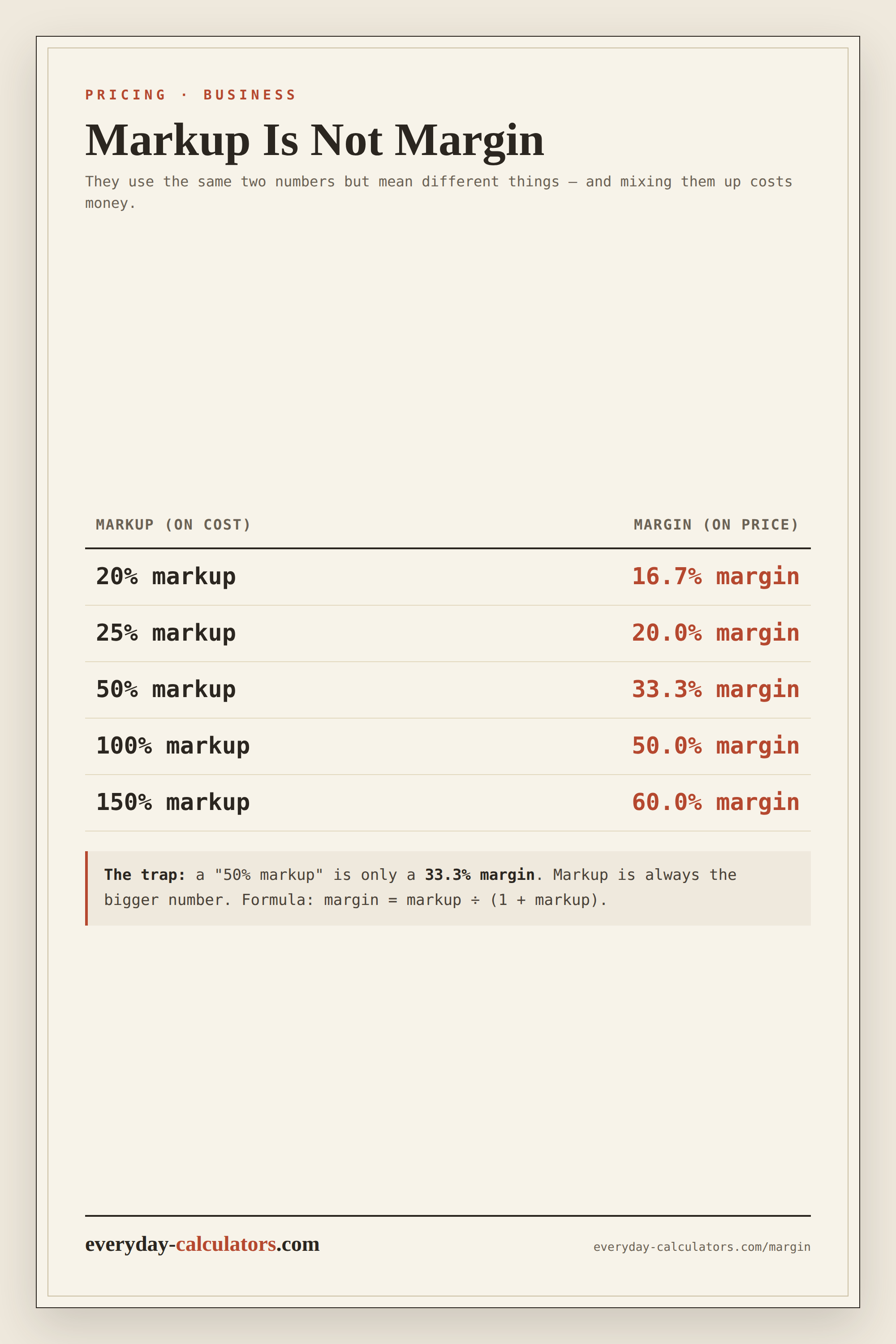
How the numbers are calculated
Profit is the sale price minus the cost. Margin is profit ÷ price × 100, and markup is profit ÷ cost × 100. If the price is below the cost, the profit and both percentages are negative — a useful warning that you are selling at a loss.
Working backwards to a price
If you know the margin you want, you can find the price: price = cost ÷ (1 − margin). To hit a 40% margin on a 60 cost, sell at 60 ÷ 0.6 = 100. To hit a target markup instead, price = cost × (1 + markup).
Why margin matters more than markup
Margin tells you what share of each sale you actually keep, which is what feeds overheads and profit. Two businesses with the same markup can have very different margins once discounts and fees are included, so margin is usually the figure to watch.
Example
You buy a product for 40 and sell it for 100. Your profit is 60, your margin is 60% and your markup is 150%. Drop the price to 60 and the profit falls to 20, the margin to 33% and the markup to 50%.
— Ceci est une estimation générale à titre informatif, pas un conseil financier. Les résultats utilisent des formules standard et n'incluent pas tous les frais, taxes ou variations de taux — vérifiez les chiffres auprès de votre prêteur, banque ou conseiller avant de décider.
Coût du carburant
FAQ
What is the difference between margin and markup?
Margin is profit as a share of the sale price; markup is profit as a share of the cost. The same 40 profit on a 100 sale is a 40% margin but a 67% markup.
How do I calculate profit margin?
Subtract the cost from the sale price to get the profit, then divide by the sale price and multiply by 100. Profit ÷ price × 100 is your margin percentage.
How do I find the price for a target margin?
Divide the cost by one minus the margin. For a 40% margin on a 60 cost, sell at 60 ÷ 0.6 = 100.
Can margin be more than 100%?
No — margin is a share of the price, so it maxes out below 100%. Markup has no upper limit because it is measured against the cost.
What if the price is below the cost?
The profit and both percentages turn negative, which means you are selling at a loss — a useful check before you set a price.